I saw this: https://hackaday.com/2020/04/13/john-horton-conway-creator-of-conways-game-of-life-has-died/, decided that I would try to write his game myself. This was just for fun and it isn’t optimized for anything really, but it might be useful to check out if you are getting into macros for Excel and need to read/update cells in a worksheet.
If you’re not comfortable downloading an .xlsm from (which is wise), the code below can just be pasted in an empty module. Make sure to name a sheet in your workbook “Life”, type in a number in cell B9 (or hardcode it), and add buttons to call the subs if you want.
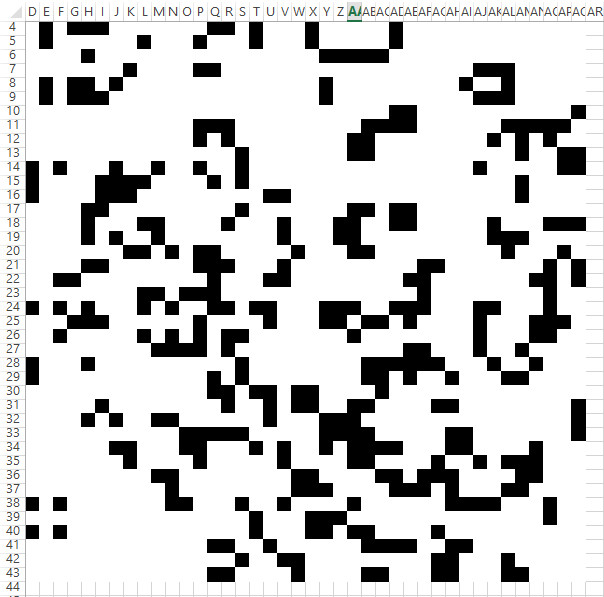
The black cells are 1’s, white cells are 0’s. Might be interesting to tweak this so it generates QR codes and see where it takes you!
Option Explicit

'by Elliot (elliotmade.com) 4/14/2020
'Conway's game of life

'there is no input validation, and literally no optimization for anything
'wrote this purposely without looking at any examples other than a description of the rules, just for fun

'rules (from wikipedia):
'    Any live cell with two or three live neighbors survives.
'    Any dead cell with three live neighbors becomes a live cell.
'    All other live cells die in the next generation. Similarly, all other dead cells stay dead.

Dim xMax As Long
Dim yMax As Long

Dim x As Long
Dim y As Long

Dim xOffset As Long 'so it doesn't have to occupy the top and left cells
Dim yOffset As Long

Dim ws As Worksheet
Dim ticks As Long
Dim maxTicks As Long

Dim currentGrid() As Byte
Dim nextGrid() As Byte


Sub initialize()
'read in the initial state

xMax = 40
yMax = 40
ticks = 0

xOffset = 3
yOffset = 3

Set ws = Worksheets("Life")

ReDim currentGrid(1 To xMax, 1 To yMax)
ReDim nextGrid(1 To xMax, 1 To yMax)

For y = 1 To yMax

    For x = 1 To xMax
        currentGrid(x, y) = ws.Cells(y + yOffset, x + xOffset)
    Next x
Next y

maxTicks = ws.Cells(9, 2).Value


Debug.Print "Initialized"

End Sub

Sub clear()
    Call initialize
    ws.Range(ws.Cells(1 + yOffset, 1 + xOffset), ws.Cells(yMax + yOffset, xMax + xOffset)).Value = 0
    Call initialize
    Call output
    Debug.Print "Cleared"

End Sub

Sub tick()
'really should do initialize if the variables aren't populated...

Dim countNeighbors As Integer

For y = 1 To yMax
    For x = 1 To xMax
        countNeighbors = 0
        'top neighbor
        If y > 1 Then
            countNeighbors = countNeighbors + currentGrid(x, y - 1)
        End If
        'bottom neighbor
        If y < yMax Then
            countNeighbors = countNeighbors + currentGrid(x, y + 1)
        End If
        'left neighbor
        If x > 1 Then
            countNeighbors = countNeighbors + currentGrid(x - 1, y)
        End If
        'right neighbor
        If x < xMax Then
            countNeighbors = countNeighbors + currentGrid(x + 1, y)
        End If

        'top left neighbor
        If x > 1 And y > 1 Then
            countNeighbors = countNeighbors + currentGrid(x - 1, y - 1)
        End If

        'top right neighbor
        If x < xMax And y > 1 Then
            countNeighbors = countNeighbors + currentGrid(x + 1, y - 1)
        End If

        'bottom right neighbor
        If x < xMax And y < yMax Then
            countNeighbors = countNeighbors + currentGrid(x + 1, y + 1)
        End If

        'bottom left neighbor
        If x > 1 And y < yMax Then
            countNeighbors = countNeighbors + currentGrid(x - 1, y + 1)
        End If

        If currentGrid(x, y) = 1 And (countNeighbors = 2 Or countNeighbors = 3) Then
            nextGrid(x, y) = 1
        ElseIf currentGrid(x, y) = 0 And countNeighbors = 3 Then
            nextGrid(x, y) = 1
        Else
            nextGrid(x, y) = 0
        End If

    Next x
Next y


currentGrid = nextGrid
Call output
ticks = ticks + 1

End Sub


Sub output()

Application.ScreenUpdating = False

For y = 1 To yMax

    For x = 1 To xMax
        ws.Cells(y + yOffset, x + xOffset).Value = nextGrid(x, y)
        If nextGrid(x, y) = 1 Then
            ws.Cells(y + yOffset, x + xOffset).Interior.ColorIndex = 1
            ws.Cells(y + yOffset, x + xOffset).Font.Color = vbBlack
        Else
            ws.Cells(y + yOffset, x + xOffset).Interior.ColorIndex = 2
            ws.Cells(y + yOffset, x + xOffset).Font.Color = vbWhite
        End If
    Next x
Next y

Application.ScreenUpdating = True
DoEvents

End Sub


Sub run()
Dim a As Long
'would be neat to end early if no changes occur between ticks...

Call initialize

If ticks = maxTicks Then
    MsgBox "Tick limit " & maxTicks & " reached"
    Exit Sub
End If

For a = 0 To maxTicks
    If WorksheetFunction.Sum(currentGrid) = 0 Then
        MsgBox "No live cells after " & ticks & " ticks"
        Exit Sub
    End If
    Call tick
Next a

End Sub

Sub randomize()
    Call initialize
    ws.Range(ws.Cells(1 + yOffset, 1 + xOffset), ws.Cells(yMax + yOffset, xMax + xOffset)).FormulaR1C1 = "=RANDBETWEEN(0,1)"
    ws.Calculate
    ws.Range(ws.Cells(1 + yOffset, 1 + xOffset), ws.Cells(yMax + yOffset, xMax + xOffset)).Value = ws.Range(ws.Cells(1 + yOffset, 1 + xOffset), ws.Cells(yMax + yOffset, xMax + xOffset)).Value
    ws.Range(ws.Cells(1 + yOffset, 1 + xOffset), ws.Cells(yMax + yOffset, xMax + xOffset)).Interior.ColorIndex = 0
    ws.Range(ws.Cells(1 + yOffset, 1 + xOffset), ws.Cells(yMax + yOffset, xMax + xOffset)).Font.Color = vbBlack
End Sub